
Microsoft Translator
Screenshots
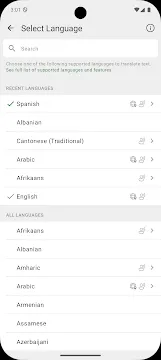
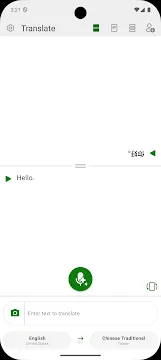
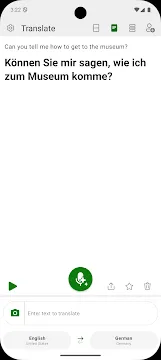
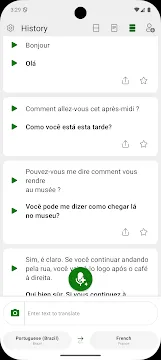
Microsoft Translator App For Android provides a reliable way to communicate across different languages instantly. People who travel or work in international business often face difficult language barriers every day. This application acts as a personal interpreter that fits right inside your pocket. You can translate text, voice, and even images into over 70 different languages with high accuracy. The software helps you understand signs, menus, and conversations while you explore new countries.
The application uses advanced machine learning to provide natural and clear translations for its users. It allows you to download specific language packs so you can use the service without an internet connection. This offline feature is essential for travelers who find themselves in areas with poor mobile data coverage. The interface remains clean and easy to use for people of all ages. Whether you are learning a new language or navigating a foreign city, this tool makes the world feel smaller and more accessible.
Real-Time Voice and Conversation Translation
The voice translation feature allows two people to speak naturally while the app translates their words out loud. You simply press a button and speak into your phone to hear the translated version in seconds. This eliminates the awkward silences that often happen when trying to find the right words. It creates a smooth flow for face-to-face interactions with locals or business partners. The app recognizes different accents and dialects to ensure the meaning remains correct.
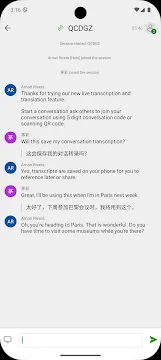
Furthermore, the multi-person conversation feature connects multiple devices together for group discussions. Each person can speak in their own language, and the app displays the translated text on everyone’s screen. This is perfect for tour groups or international meetings where several languages are spoken at once. You can follow along with the discussion in real time without needing a human translator. It promotes better understanding and collaboration among diverse groups of people.
Advanced Camera and Image Translation
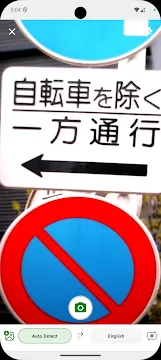
Reading foreign signs and documents is much easier with the integrated camera translation tool. You only need to point your smartphone camera at any text to see the translation appear instantly on your screen. The app overlays the translated text directly onto the original image to maintain the context. This helps you identify street names, read restaurant menus, and understand warning labels quickly. It saves you from the tedious task of typing foreign characters into a search bar.
- Translate text from photos you have already taken.
- Capture live images to get instant feedback.
- Save important translated images for future reference.
- Use the flash feature to read text in dark environments.
This technology is incredibly useful for navigating transportation systems in unfamiliar cities. You can quickly scan train schedules or bus routes to ensure you are heading in the right direction. The system handles various fonts and layouts with ease to give you a clear reading experience. It turns your camera into a powerful tool for decoding the world around you.
Offline Translation for Stress-Free Travel
Internet access is not always available when you are on the move in a foreign country. Microsoft Translator solves this problem by offering downloadable language packs for offline use. You can choose the specific languages you need before you leave your home or hotel. This ensures that you have access to translation tools even in remote areas or on airplanes. The offline mode supports both text and camera translations to keep you prepared for any situation.
Using offline packs also helps you save money on expensive international roaming charges. You do not need to keep your mobile data turned on to understand the local language. The app manages your storage space efficiently and allows you to delete packs you no longer need. This flexibility makes it a favorite choice for backpackers and frequent flyers alike. You can travel with confidence knowing that you always have a way to communicate.
Comprehensive Phrasebooks and Pronunciation Guides
Sometimes, you need to learn common phrases to show respect to the local culture. Microsoft Translator app includes a built-in phrasebook that covers essential topics like greetings, emergencies, and dining. Each phrase comes with a high-quality audio recording so you can hear the correct pronunciation. You can practice speaking these phrases yourself to improve your language skills over time. This feature bridges the gap between simple translation and actual language learning.
You can also pin your most frequently used translations to a “Favorites” list for quick access. This is helpful for phrases you use every day, such as your hotel address or a dietary restriction. The app even shows you the phonetic spelling of words to help you read them out loud more accurately. It encourages you to interact more deeply with the people you meet during your travels. You gain a better appreciation for different cultures by attempting to speak their tongue.
Seamless Integration with Other Android Apps
This translation tool works perfectly with the other applications you use on your Android device. You can translate text from your web browser, email, or messaging apps without switching screens. You simply highlight the text you want to understand and select the translator option from the menu. This saves time and keeps your workflow consistent when you are busy. It acts as a helpful assistant that is always ready when you need it.
The app also supports wearable technology like Android watches. You can get quick translations right on your wrist while your phone stays in your pocket. This is very convenient when you are carrying luggage or navigating a crowded market. The software receives regular updates to ensure it stays compatible with the latest mobile features. It provides a modern and integrated experience for every user.
Professional Tools for Document Translation
Beyond simple phrases, the Microsoft Translator application can handle longer pieces of text and official documents. You can copy and paste entire paragraphs to get a comprehensive translation in an instant. This is useful for reading news articles, emails, or instruction manuals from international sources. The engine maintains the original tone and structure of the writing as much as possible. It helps you stay informed about global events and technical information.
The system also allows you to share your translations with others via social media or messaging apps. You can send a translated message to a friend or colleague to bridge the communication gap. This feature makes the app a valuable tool for both personal and professional use. It ensures that your message is heard and understood regardless of the language you speak. You can build stronger connections with people all over the world.
Final Thoughts
Microsoft Translator App For Android represents a major step forward in breaking down global communication barriers. It provides a suite of tools that address the needs of travelers, students, and professionals. By offering voice, camera, and offline translations, it ensures that you are never left without a way to understand others. The simple interface and integration with other apps make it an essential part of any modern smartphone. You can explore new cultures and grow your business without the fear of being misunderstood. This application empowers you to speak to the world with confidence and clarity every day.